





 Football in Budapest
 Tennis in Budapest
 Handball in Budapest
 Basketball in Budapest
 Volleyball in Budapest






Invite another parent or guardian to help manage this player profile. They will be able to RSVP to events and make payments.
-
Find your child's profile
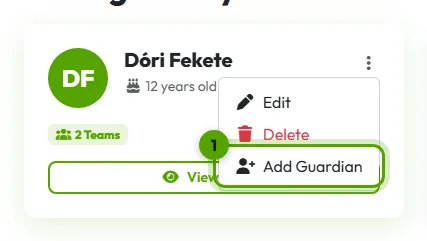
Click your picture in the top right corner, then My Players. Click the ⋮ button on your child's card, then Add Guardian.
-
Send the invitation
Type the other parent's email address and click Send Invitation. They get an email with a link to accept.
Once they accept, your child appears in their account too, with the same teams, events and payments. Both of you can answer and pay; you'll always see the latest answer.