





 Football in Budapest
 Tennis in Budapest
 Handball in Budapest
 Basketball in Budapest
 Volleyball in Budapest






A membership fee is charged every week, month or year to each member of the team. Grundee creates the payments by itself and players pay them from their own account.
-
Open the team's settings
On your team page, open Manage → Edit Team Details.
-
Set the fee
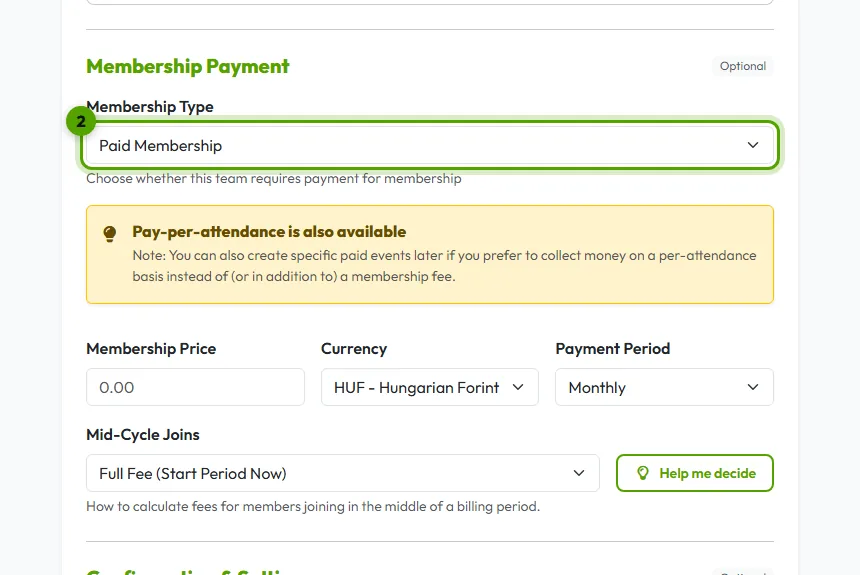
Under Membership fee choose Recurring Fee, then set the price, the currency and the period: weekly, monthly or yearly.
-
Decide about players who join mid-period
- Full Payment Now: The player pays the full period fee immediately upon joining, regardless of how much time is left.
- Pro-rated Next Period: The player doesn't pay now, but their first full invoice will include a pro-rated amount for the remaining days of the current period.
- Wait Until Next Cycle: The player joins for free now and will only be charged when the next full billing cycle starts.
-
Save
Click Save Changes. Grundee then creates a payment for each member at the start of every period.
Good to know
- New players see the fee before they join, on the invitation and in the request to join.
- Someone paid in cash? Record it so it shows as paid.
- You can still charge for single events on top, see charging for an event.