





 Football in Budapest
 Tennis in Budapest
 Handball in Budapest
 Basketball in Budapest
 Volleyball in Budapest






Card payments on Grundee go through Stripe, a payment provider used by millions of businesses. Connect your own Stripe account once, and what your players pay lands in your bank account.
-
Open your payment settings
Click your picture in the top right corner, then Account Settings, and choose Payments on the left.
-
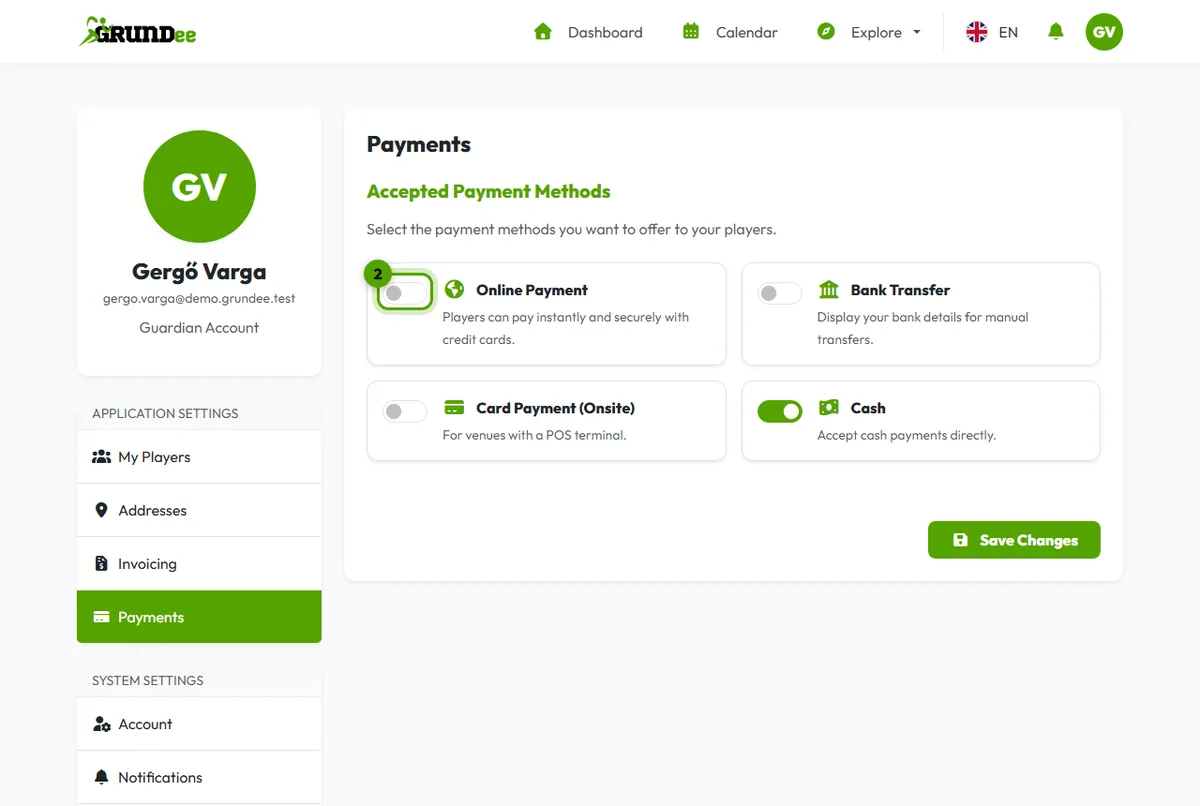
Choose the ways you accept money
Switch on Online Payment for card payments, and accept the transaction fee shown next to it. You can also switch on Bank Transfer and Cash: players then see your bank details or know to pay you in person.
-
Tell Stripe who you are
Choose Individual for yourself, or Company for a registered business or club, pick the country of your bank account and click Save Changes.
-
Finish on Stripe's page
Click Complete Onboarding with Stripe. Stripe asks for your bank account (IBAN) and your personal or company details. When you're done, you come back to Grundee and the page shows Stripe Account Active.
When does the money arrive?
Stripe pays out to your bank account on a regular schedule, usually within a few working days. Your balance and the next payout are shown on your team page under Manage → Manage Team Payments.
See also: fees for online payments.