





 Football in Budapest
 Tennis in Budapest
 Handball in Budapest
 Basketball in Budapest
 Volleyball in Budapest






In a Grundee tournament the players can send in their own scores. You (or your child's parent, or your team's manager) report the score after the match, the other side confirms it, and it goes in the bracket. If the two sides don't agree, the organiser decides.
-
Find your matches
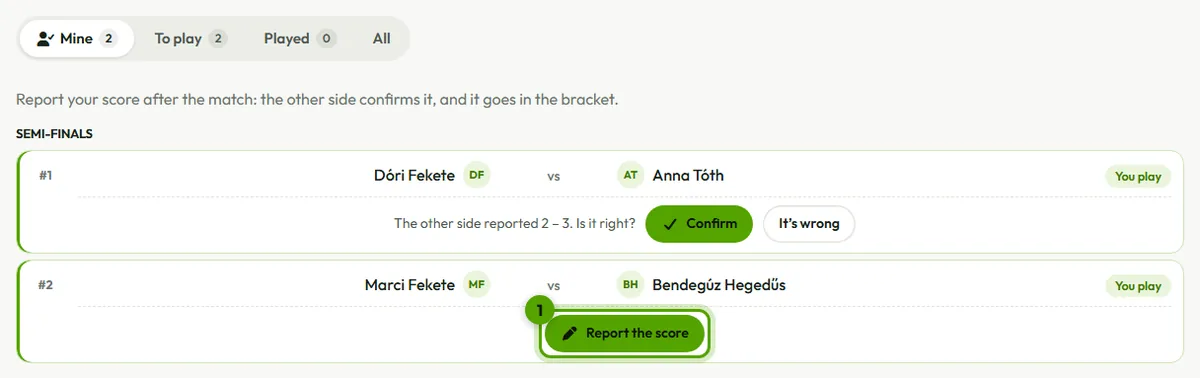
On the tournament's page, Matches opens on Mine: your matches (or your child's, or your team's), when and where they are, and what's left to do, right on each match. It's there when the organiser linked the player or team to Grundee, or when you signed up yourself.
-
Report the score
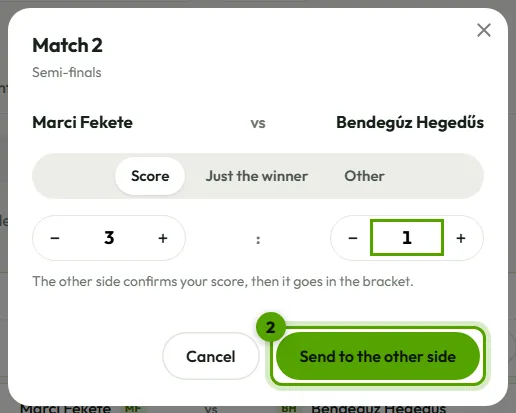
After the match, tap Report the score, enter the score as you would on the scoresheet, then Send to the other side. For a walkover or a match someone retired from, choose Other.
-
Confirm or dispute
When the other side reports, you get a notification and an email. If the score is right, Confirm: it goes in the bracket at once. If it isn't, It’s wrong: the organiser hears about it and decides.
For organisers
Scores waiting for an answer and disputed ones are listed on the Matches tab under Reported scores. Accept one, or enter the right result yourself: the result you enter always wins.

Good to know
- A reported score nobody answers becomes the result after 24 hours. Organisers can turn this off, or turn player reports off altogether, in the tournament's settings.
- If both sides report, the newer score replaces the older one, and the other side is asked again.
- When the organiser sends the order of play, each player gets their own matches by email, and a reminder about an hour before each match.