





 Football in Budapest
 Tennis in Budapest
 Handball in Budapest
 Basketball in Budapest
 Volleyball in Budapest






A Grundee tournament is a bracket that your team, club or venue runs from its accounts: everyone who manages it can enter results, there is no edit link to look after, and players linked from Grundee find it in their account.
-
Start a new tournament
Click New tournament on your club dashboard, on your venue's dashboard, or on the Tournaments card under Explore in the menu.

-
Choose who organises it and who can see it
After the sport, pick the team, club or venue under Organised by: all its managers can run the tournament. Choose Organisers and entrants if only they and the players should see it.

-
Add the entrants
Pick players and teams from Add your players: the list holds your own players, the rosters of the organising team or club, and the teams you manage. Type the names of anyone who isn't on Grundee. The rest works like any bracket: format, scoring and seeding.
-
Link entrants later
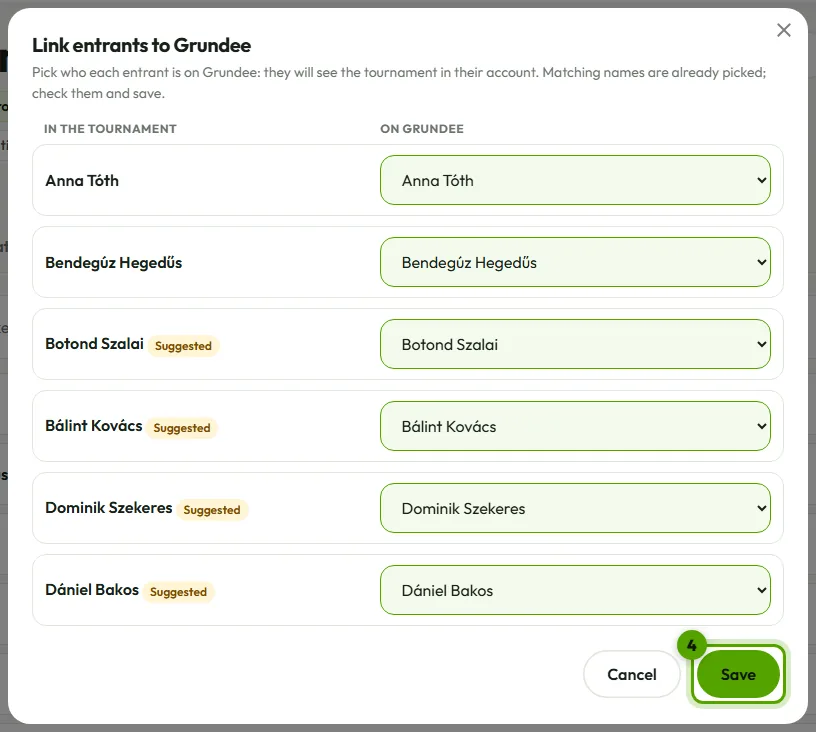
On the Entrants tab, Link to Grundee matches typed names with your players and teams (the ones with the same name are picked for you). Linked players find the tournament under Tournaments and on their dashboard.
Invite co-organisers
Someone outside your team, club or venue helps on the day? On the Settings tab, under Co-organisers, invite them by email. They accept with their own Grundee account and can then enter results, plan the matches and manage the sign-ups. You can take back an invitation, the head of the organisers can take a co-organiser off, and a co-organiser can leave.
Turn a free bracket into a Grundee tournament
Made a bracket with the free maker and saved it to your account? Open its Settings tab and use Make it a Grundee tournament, then pick the organiser. Its edit link stops working: from then on the organisers' accounts manage it.
No team yet? Create a team for free under your own bracket makes one with the tournament's name and sport, makes it the organiser, and shows the invite link with everyone in the bracket to send it to.