





 Football in Budapest
 Tennis in Budapest
 Handball in Budapest
 Basketball in Budapest
 Volleyball in Budapest






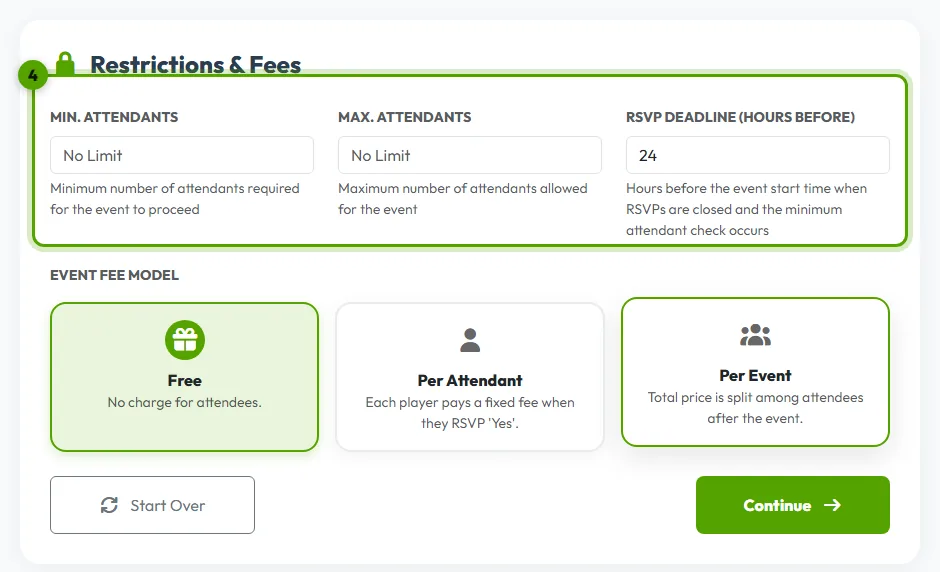
Organizers set these under Restrictions & Fees when they schedule an event. Here is what each one does.
RSVP deadline
How many hours before the start answers close. Until then players can change their answer; after it, the event page shows “RSVP Deadline Passed”.
- 2 hours before the deadline, players who haven't answered or said Maybe get an automatic reminder.
- 6 hours before the deadline, organizers get a “Who's coming?” summary by email.
Minimum number of players
If fewer players have said Yes than the minimum when answers close, Grundee cancels the event and tells everyone, so nobody turns up to a game that can't be played.
Maximum number of players and the waitlist
When the event is full, new players can join the waitlist. As soon as someone drops out, the first player on the waitlist moves up and gets told.
Who counts as coming by default?
Each team chooses its RSVP policy in its settings:
- Opt-In: members must manually confirm. Nobody counts as coming until they say Yes.
- Opt-Out: members are automatically attending by default, and only answer if they can't make it.