





 Football in Budapest
 Tennis in Budapest
 Handball in Budapest
 Basketball in Budapest
 Volleyball in Budapest






Your answer tells the organizer how many are coming, so the game can go ahead. It takes one tap.
From the email
Before each event you get an email with one-tap Yes / Maybe / No buttons. Tap one and you're done: no need to sign in.
On the event page
-
Open the event
Find it on your dashboard under the upcoming events, or in your calendar.
-
Answer
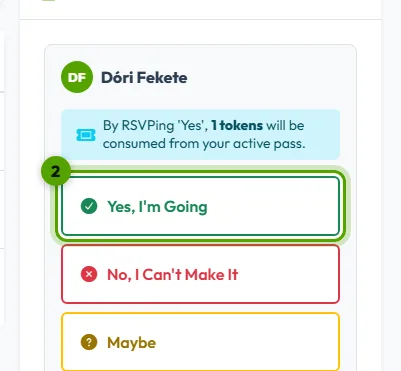
Choose Yes, I'm Going, No, I Can't Make It or Maybe. You can add a reason for the organizer, then click Submit RSVP.
Answering for your child
Parents answer for each child on the same event page: there is one answer per player.
Good to know
- You can change your answer until the RSVP deadline; the event page shows how much time is left.
- If the event is full, you can join the waitlist and you move up as soon as someone drops out.
- Some teams count everyone as coming by default. Then you only need to answer if you can't make it.
- If the event has a fee, answering Yes means you agree to pay it.
Can't answer? See the usual reasons.