





 Football in Budapest
 Tennis in Budapest
 Handball in Budapest
 Basketball in Budapest
 Volleyball in Budapest






Every team, coach and family of the club on one dashboard: schedules, members and payments in one place. Setting up a club is free. Each team uses its own plan: free up to 6 members, Captain at 3 000 Ft or Coach at 7 500 Ft a month.
-
Set up your club
On your dashboard click Create New Team, then Choose Club Manager. Give your club a name, a badge and a short description.
-
Invite your coaches
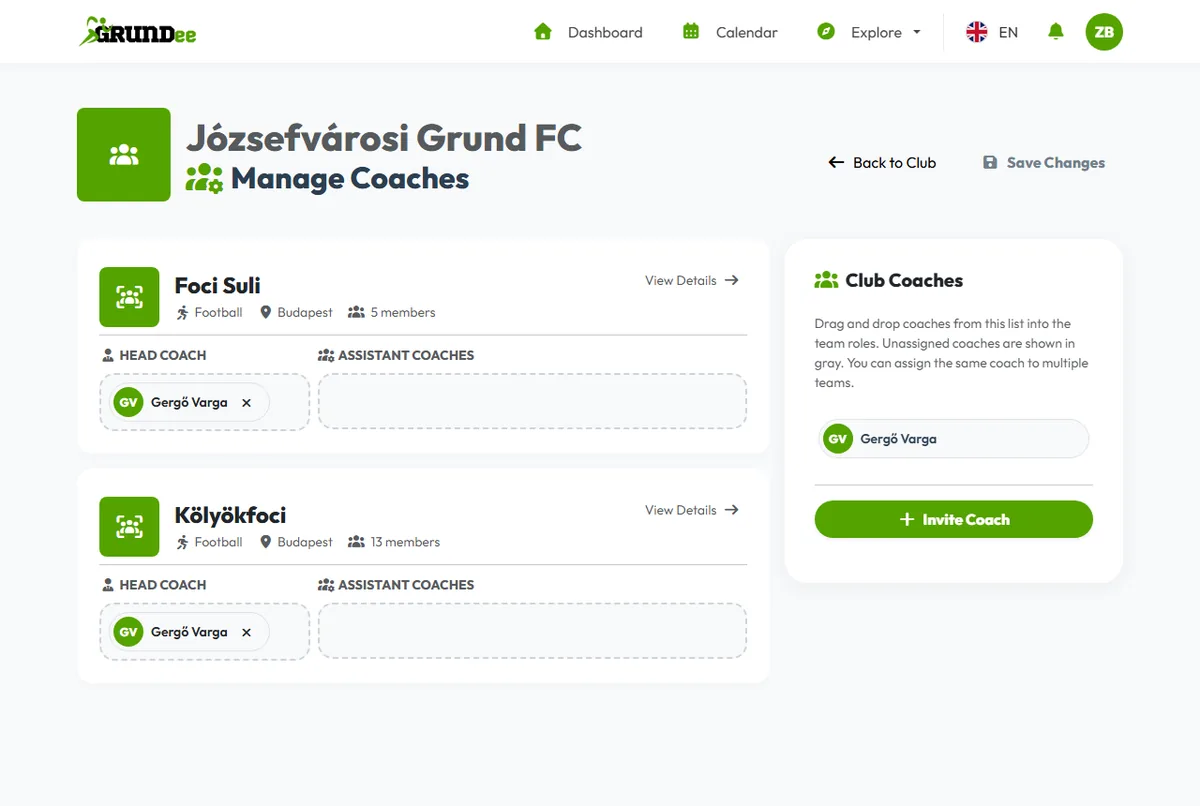
On the club dashboard open Manage → Manage Coaches and click Add Coach. Enter the coach's name and email address. They get an email invitation to join the club; if they are new to Grundee, they set their password from that email.
-
Add the club's teams
Click New Club Team on the club dashboard. Each team is set up like any other team, as a captain's or a coach's team.
-
Give each team its coaches
On the Manage Coaches page, drag coaches into each team's Head Coach and Assistant Coaches places. The same coach can work with several teams.
What the club dashboard shows
- Every team with its members and next events
- The club roster: every player of every team
- Revenue and invoices across the club
- Club-wide announcements