Football in Budapest
 Tennis in Budapest
 Handball in Budapest
 Basketball in Budapest
 Volleyball in Budapest






Everyone in a team has a role. It decides what they can see and change.
| Role | What they can do |
|---|---|
| Player | Sees the team page and the schedule, answers events, pays fees and can invite friends by email. |
| Assistant | Helps run the team: schedules and cancels events, posts announcements, invites players and sees attendance. Doesn't handle the team's money or settings. |
| Captain | Created the team and plays in it. Can do everything: settings, roster, roles, events and payments. |
| Coach | Created the team but doesn't have to play in it. Can do everything, plus passes and automatic invoices. |
| Club Manager | Sees and runs every team of the club, and adds the club's coaches. |
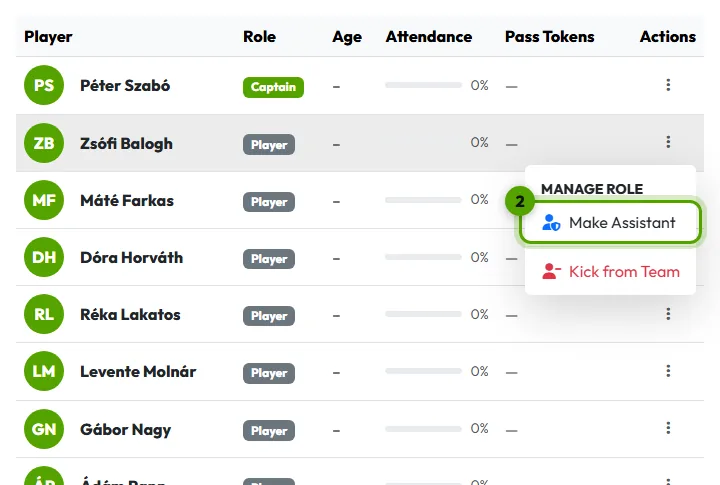
Make someone an assistant
-
Open the roster
On your team page, open Manage → Team Roster.
-
Change the role
Click the ⋮ button at the end of the player's row. Under Manage Role choose Make Assistant. To take it back, choose Make Player.